

An AI assistant can sound fluent while relying on an outdated return policy. The writing problem and the knowledge problem are different. Before adjusting the assistant’s tone, check whether the source it is using is current, specific and approved for the question being asked.
Start with real questions
Take a sample of recent conversations and group them by the job the customer was trying to complete: change a booking, find an order, understand a charge or report a fault. Preserve the customer’s wording as a test question. Internal department names rarely make good headings for an answer customers need quickly.
Choose a small starting set that your team can maintain. Twenty current answers with clear boundaries are more useful than hundreds of duplicated pages. Where two sources disagree, resolve the policy conflict before connecting both. The assistant should not be expected to decide which department’s document wins.
Write an answer that names its boundaries
Lead with the direct answer, then explain eligibility, steps and exceptions. State the product, region or customer group the answer applies to. If a time estimate depends on a particular delivery method, say so. Do not place a crucial exception only in a screenshot or an unexplained attachment.
| Field | What to record |
|---|---|
| Customer task | Change an order before dispatch |
| Approved answer | The current rule and required steps |
| Applies to | Product, location or customer group |
| Exceptions | When a person must review the request |
| Owner | The person authorised to update the answer |
| Review trigger | Policy change, product release or scheduled review |
Keep live data out of general policy answers
A knowledge article can explain how to track an order. It cannot confirm where a particular order is now unless a current, authorised lookup supplies that information. Treat static knowledge and connected tools as separate sources of evidence. A failed lookup should lead to a useful explanation or handoff, not an invented status.
Before exposing account-specific information, establish the identity checks appropriate to that action. A public FAQ about delivery areas and a request to change someone’s address have very different consequences. Write those boundaries into your operating scenarios as well as the knowledge article.
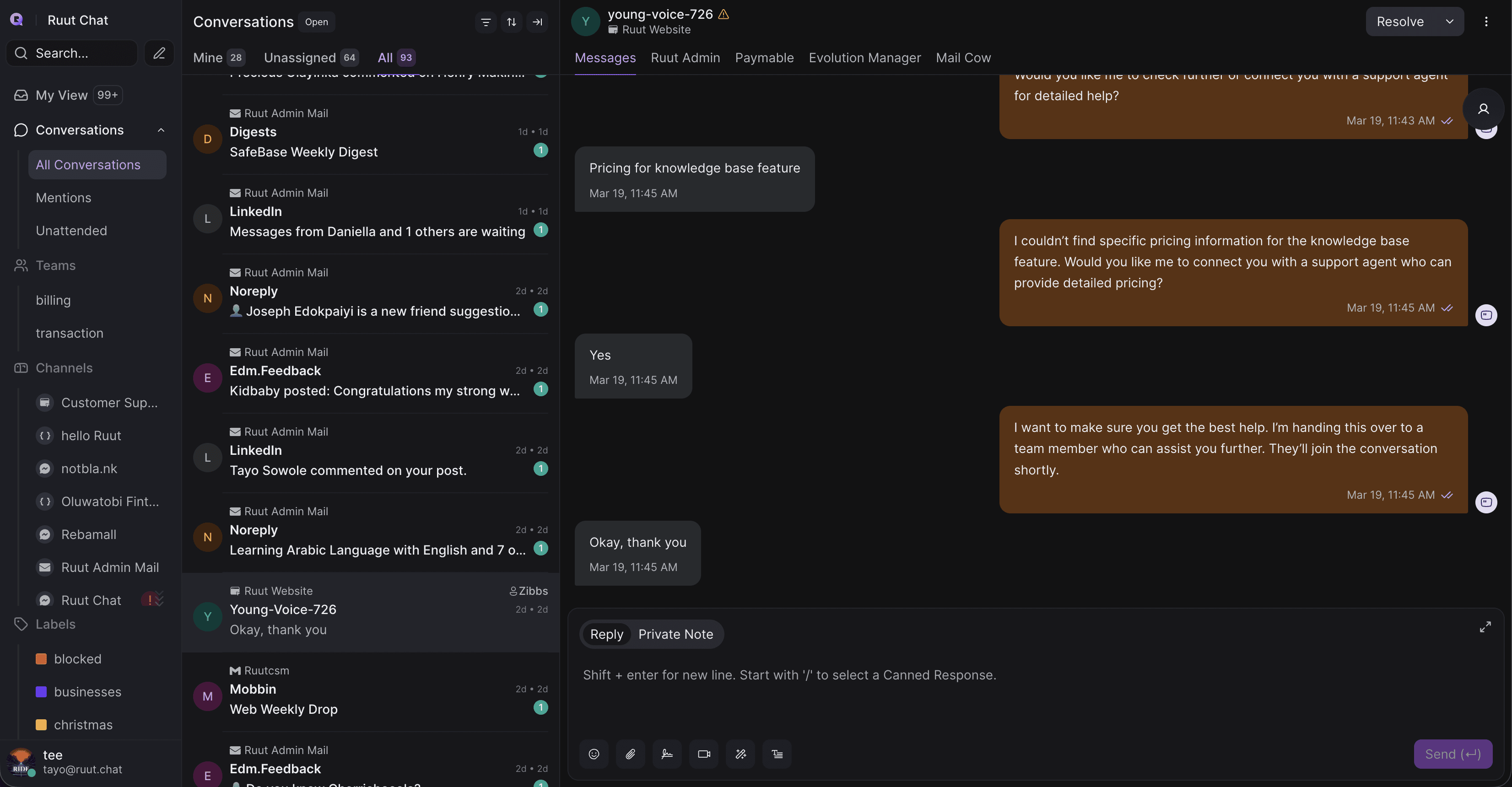
Test for gaps and contradictions
- Ask the same question in the phrasing customers actually use, including abbreviations.
- Try a request that falls just outside the stated policy.
- Include an outdated assumption, such as an old price or retired feature.
- Test a question for which no approved source exists.
- Test the expected handoff and inspect the information the receiving agent gets.
Record the answer, the source used, whether it was correct and the desired outcome. A polite handoff may be the correct result. Do not grade every conversation that reaches a person as an AI failure; that encourages automation in situations where the safer and more helpful action is escalation.
Make updates part of the release process
Assign knowledge updates alongside a product or policy change. The owner should update the authoritative answer, remove or revise conflicting copies and rerun the affected questions. Keep a small change log so the support lead can explain why an answer changed. Review frequently used or higher-risk sources more often than rarely used background material.
In Sage, review the knowledge and tools connected to the assistant you are evaluating. A published Help Center article is not evidence that every assistant is using it; verify the connection and test the resulting answer. This also makes it easier to distinguish a missing source from a retrieval or instruction problem.
Continue with writing help center articles for a practical next step.
Test a policy change before publishing it
Suppose the exchange window changes from 14 days to 30 days for orders placed after a specific date. Update the approved source, remove or qualify the old answer, and test orders from both sides of the date. A single new FAQ is insufficient if a conflicting old page remains searchable. Keep the expected answer with the test question so the next reviewer can spot a regression.
Evaluating software for this workflow? Read Ruut vs Tidio for package considerations and a practical demonstration checklist.
Cover artwork: AI-generated editorial imagery for Ruut. People and settings are illustrative; product screenshots in this guide show the actual Ruut interface.
Frequently asked questions
Does a larger knowledge base always improve answers?
No. Duplicate, conflicting or outdated material can make evaluation harder. Start with relevant sources you can maintain.
Can approved sources guarantee zero wrong answers?
No. They improve the foundation, but you still need tests, monitoring and an escalation path.
Should every handoff become a new FAQ?
No. Some requests need account access or human judgement. Add knowledge only when a maintained factual answer is appropriate.


No comments yet.